
Business Not Showing on Google Maps? 11 Free Fixes That Work
Missing from Google Maps or just ranking low? Use a 60-second test to find out, then work through 11 fixes for Indian local businesses, in the order we'd do them.
Table of contents
- First, are you missing or just ranking low?
- Business not showing on Google Maps at all? Start with fixes 1 to 6
- On Google Maps, but customers can’t find you? Fix your ranking
- What not to do while you’re fixing it
- How long does it take for a business to show up on Google Maps?
- Your 5-minute Google Maps self-check
- Does this also help with Google’s AI answers?
- Still have a business not showing on Google Maps? We’ll check it free
- Frequently asked questions
Quick answer: Business not showing on Google Maps? It’s usually because your Google Business Profile is unverified, suspended, duplicated, or breaks Google’s name and address rules. If it shows up for its own name but not for “near me” searches, that’s a ranking problem: fix your primary category, complete the profile, add photos, get reviews and keep your details the same everywhere.
Picture a sweet shop that’s been on the same Gariahat corner for 20 years. Everyone in the para knows it. Then a customer standing 300 metres away types “sweet shop near me” into Google Maps, and three other shops show up.
Not yours.
That customer isn’t being disloyal. They just never saw you. And it happens to far more Indian businesses than you’d think: salons, clinics, hardware stores, coaching centres, cafes. The shop is real and the customers are real, but on Google Maps the business is either missing or buried so far down the list that nobody scrolls to it. (Be honest. When did you last scroll past the first few results?)
Here’s the good part. A business not showing on Google Maps usually comes down to a short list of problems, and most of them you can fix yourself, for free. Below you’ll find a one-minute test to work out which problem you have, then 11 fixes in the order we’d tackle them.
First, are you missing or just ranking low?
Don’t change anything yet. “Not showing on Google Maps” can mean two very different things, and they need different fixes. Mix them up and you can spend weeks editing the wrong part of your profile.
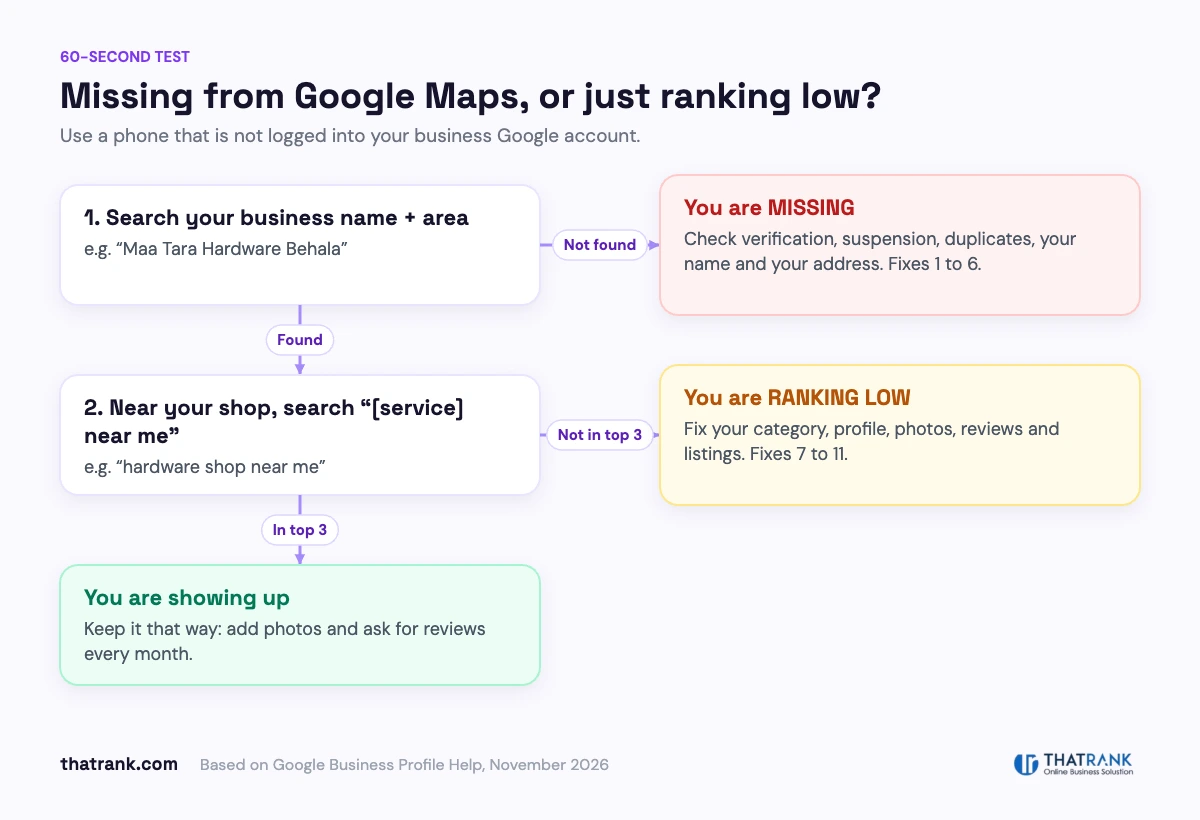
Grab a phone that isn’t logged into your business Google account. A family member’s phone works, or an incognito window. Then run these four checks:
- Search your exact business name plus your area, for example “Maa Tara Hardware Behala”.
- Search what you sell plus your area, for example “hardware shop Behala”.
- Stand near your shop and search “[what you sell] near me” in the Google Maps app.
- Zoom into your street on the map. Is your pin there, and is it on the right building?
Now match what you saw:
| What you see | What it usually means | Go to |
|---|---|---|
| Not found, even by exact name | The profile is unverified, suspended, duplicated or not live yet | Fixes 1 to 6 |
| Found by name, but not for “[service] + area” | It’s live, but Google doesn’t see it as a strong match | Fixes 7 to 11 |
| Found for area searches, but not “near me” from close by | Competitors are closer or better known, or have more reviews | Fixes 9 to 11 |
| Pin on the wrong building or road | Address or pin problem | Fix 6 |
| Shows as closed, or with wrong hours | Hours not set, or someone suggested an edit | Fixes 3 and 8 |
Business not showing on Google Maps at all? Start with fixes 1 to 6
If your business doesn’t appear even when you type its exact name, Google either isn’t showing the profile to the public or doesn’t have a live one. Work through these in order. The first two are the usual suspects.
1. Your profile isn’t verified (or verification is still under review)
Google’s help page doesn’t soften this: only verified businesses can show their details on Maps and Search. You might see your profile inside your account and assume it’s live. Customers can’t.
To check, log into the Google account that manages the business and search “my business” on Google. If you see “Get verified” or anything about verification, that’s your answer.
A few things worth knowing before you try again:
- Google decides which methods you get. It could be phone, SMS, email, a video recording, a live video call or a postcard.
- IVR lines don’t work. If your shop number answers with “Press 1 for sales”, the verification call won’t reach you. Google says IVR systems won’t get the code, so use a mobile number or pick another method.
- Plan a video before you press record. Start outside with your signboard and a street sign or nearby shop in frame. Walk in without cutting. Show your counter, stock or equipment, then something only an owner has: the shop keys, the billing system, a staff-only room.
- Give it time. Google says verification reviews take up to 5 business days, and sometimes longer. Postcard codes usually arrive within 14 days and expire after 30.
The most common slip with video? Filming only inside the shop. A nice shot of your shelves tells Google nothing about whether you’re at the address on the profile.
2. Your profile is suspended
You’ll usually see a warning in your dashboard, or the profile just vanishes overnight. Google says it may suspend or disable profiles that don’t follow its guidelines, and those profiles are hidden from the public.
Don’t panic, and don’t rush. Here’s the order:
- Find and fix the cause first. Read Google’s Business Profile guidelines with your profile open beside them. Common triggers are a keyword-stuffed name, a virtual office address, two profiles for one shop, or a home address showing for a business that visits customers.
- Collect proof that matches your profile exactly. Google lists business registration, licences, tax certificates and utility bills as useful evidence. In India that could be your GST registration certificate, trade licence, Shop and Establishment registration, Udyam certificate or a recent electricity bill. The name and address on these should match the profile word for word.
- Submit through Google’s appeals tool. You can only appeal a decision once, so send it when your evidence is ready, not before.
- Wait for the email. Google doesn’t publish a timeline for appeals.
Two things not to do. Don’t create a new profile for the same business, which Google warns against directly. And don’t pay the person on Facebook promising “100% reinstatement in 24 hours”. Only Google can reinstate a profile.
3. You’re checking from the wrong account, or the profile is just new
Sometimes nothing is broken. Google says rankings for new businesses can take up to a month to appear, and edits can take up to 3 days to show. If you verified last week, give it time before you start changing things.
Also check you’re signed into the right Google account. Plenty of owners set up the profile on an old Gmail ID, or a nephew set it up on his. If you can’t see the dashboard, that’s an access problem, not a Maps problem.
4. There’s a duplicate listing of your business
Duplicates sneak in all the time. A customer added your shop to Maps years ago. A former employee made one. You lost access to the old profile and created a new one. Now Google has two versions of you and has to pick one, and it doesn’t always pick the one you’re managing. Your reviews end up split between them too.
How to clean it up:
- If both are in your account: Google marks the extra one as a duplicate and doesn’t show it on Maps. You can remove it from your account. Check carefully first, because removing a profile deletes its content.
- If the duplicate isn’t yours: open it on Google Maps, tap “Suggest an edit”, then “Close or remove”, and mark it as a duplicate. If nothing changes within 72 hours, contact Google Business Profile support.
- If the old one has all your reviews and you lost access: request ownership of it rather than building on the new one.
5. Your business name breaks Google’s rules
You’ve seen names like this: “Sharma Mobile Repair | Best iPhone Screen Replacement Salt Lake Sector 5”. It’s tempting, because stuffed names sometimes rank for a while.
But Google wants the name you actually use on your signboard, bills and website. Its guidelines rule out taglines, service descriptions, location details, phone numbers and words in all caps. Competitors can report a stuffed name, and fixing it later can send your profile back for review. Keep it as “Sharma Mobile Repair” and put “iPhone screen replacement” in your services list, where it belongs.
One India-specific trap: bilingual signboards. Google doesn’t allow the same name repeated in two languages or scripts, so pick the version your customers actually search for.
6. Your address or map pin is wrong
Indian addresses are a special kind of puzzle. “Opp. SBI, near Durga Mandir, 2nd lane” works perfectly for a delivery boy. Google wants something more precise, and it says landmarks should only be used when the street address can’t pinpoint you.
- Put the shop number and floor in address line 2, for example “Shop 14, 1st Floor”.
- Check the PIN code. Neighbourhoods often straddle two, and a wrong one can push you into the wrong area.
- Write the locality the way it appears on your GST certificate and bills, so your proof matches if Google ever asks.
- Drag the pin onto your actual entrance, not the middle of the building or the road behind it.
- If customers don’t visit you (electricians, AC repair, home tutors, caterers, cleaning services), set a service area and hide your home address. Google says service areas generally shouldn’t go beyond about 2 hours’ drive from your base.
- Virtual offices aren’t eligible. A co-working desk only counts if it has your signage, your own staff and customers coming in during business hours.
Stuck on fixes 1 to 6? Send your Google Maps link to us on WhatsApp and we’ll tell you what’s blocking it, free.
On Google Maps, but customers can’t find you? Fix your ranking
If your business shows up for its own name but disappears for “salon near me”, the profile is live. It’s just losing to other businesses.
Google says local results depend mainly on relevance, distance and how well known a business is. You can’t move your shop closer to every customer. You can make your profile a stronger match and build your reputation, and that’s what fixes 7 to 11 do.
And no, you can’t pay for it. In Google’s words, “There’s no way to request or pay for a better local ranking.” Google Ads can put you in the sponsored spots on Maps, but that’s an ad, and it stops when the budget does.
7. Your primary category is wrong or too broad
Your primary category is one of the clearest signals you give Google about which searches you should appear for. Get it wrong and you’re invisible for the searches that matter.
This one is common: a bakery listed as “Store”, a physiotherapy centre listed as “Medical clinic”, a bridal makeup studio listed as “Beauty salon”. Google’s own test is simple. Finish the sentence “This business IS a ___”, not “This business HAS a ___”. Pick the most specific category that’s true, add a few secondary ones, and stop there.
Quick trick: search your main service and open the top three profiles. Their primary category shows right under the business name. If they all use one you’ve never considered, look at it seriously.
8. Your profile is half-filled
Google’s ranking help page asks you to keep your information complete and accurate, because complete details help it match you to more searches. Plenty of profiles stop at name, phone and address. Go through every section:
- Services, each with a short, plain description.
- Products, if you sell any, with photos and prices.
- Business description, up to 750 characters. Say what you do, where, and for whom. No keyword lists.
- Hours, plus special hours for Durga Puja, Diwali, Eid, Christmas and other days you close early.
- Attributes like wheelchair access, parking and payment options.
- Opening date, website link and booking or WhatsApp link.
Hours deserve a special mention. A customer searching at 8pm sees “Closed” against your name and simply moves on, even if you’re open till 10. If you shut for a few weeks in the off-season, Google suggests marking the business temporarily closed instead of changing your regular hours.
9. You have few reviews, or you never reply
Google is open about this: more reviews and positive ratings can help your local ranking, and replying shows customers you care. It’s also the first thing customers compare. Which would you trust more: a 4.6 with 180 reviews, or a 4.9 with 6?
Getting reviews in India is mostly about timing and making it easy:
- Ask at the happy moment: the bridal look is done, the AC is cooling, the report came back fine.
- Print the review QR code from your profile and keep it at the counter and on your bills.
- Send the review link on WhatsApp right after the job, with one line of thanks.
- Reply to every review, good or bad, in two or three calm lines.
Never buy reviews, and don’t offer discounts in exchange for them. Google treats that as fake engagement, and it can cost you far more than a few stars. We wrote a full guide on getting more Google reviews for clinics in Dubai, and the asking scripts work for any business.
10. Your photos are old, few or missing
A profile with three blurry photos from 2019 looks closed, even when it isn’t. Google recommends adding photos and videos that show what you offer, and customers use them to decide whether to visit.
Upload your signboard from the road (this also helps people find you on arrival), the inside of the shop, your team, your products and real examples of your work. Then add a few new ones every month. Phone photos taken in daylight are fine. Stock images aren’t.
11. Your details don’t match across the web, and your website doesn’t back you up
Your business name, address and phone number probably live in more places than you remember: JustDial, IndiaMART, Sulekha, Facebook, Instagram, Zomato or Swiggy if you sell food, Practo if you’re a clinic. When one of them still shows the old shop address or a number you gave up in 2021, customers end up confused, and your business looks less established than it is.
Spend one evening making them all match your Google profile exactly. Same spelling, same address format, same phone number.
Then check your website. A simple page with the same name, address and phone, a list of the services you named on Google and an embedded map does a lot to confirm you’re real. Link to that page from your profile’s website field.
One more thing to check while you’re there. If your website field still points to an old “business.site” address, Google switched those free Business Profile websites off in March 2024, so that link sends customers nowhere.
What not to do while you’re fixing it
- Don’t create a second profile to “start fresh”. It creates a duplicate and can make a suspension worse.
- Don’t edit your profile every day. Edits can take up to 3 days to show. Make your changes in one sitting, then wait.
- Don’t buy reviews or “review packages”. They get removed, and they can put the whole profile at risk.
- Don’t pay anyone who guarantees the number one spot on Maps. Google itself says ranking can’t be bought.
- Don’t use a virtual office address to look bigger or to cover a second city.
How long does it take for a business to show up on Google Maps?
Here are the timelines Google gives in its own help pages, plus what to expect for ranking.
| Situation | How long |
|---|---|
| Edits to your profile | Up to 3 days |
| Verification review | Up to 5 business days, occasionally longer |
| Postcard verification code | Usually within 14 days, expires after 30 |
| A new business ranking in search | Up to a month |
| Suspension appeal | No fixed time; Google emails the decision |
| Ranking better after fixes 7 to 11 | Weeks, not days, and it depends on your competition. Check once a month. |
Your 5-minute Google Maps self-check
Run through this once a month. If every row looks right, you’ve done your part.
| Check | What good looks like |
|---|---|
| Verification | Verified, with no warnings in the dashboard |
| Name | Same as your signboard and GST certificate, no extra keywords |
| Primary category | The most specific one that’s true |
| Address and pin | Shop number and floor included, correct PIN code, pin on the entrance |
| Service area | Home address hidden if customers don’t come to you |
| Hours | Real hours, festival hours set in advance |
| Photos | Signboard, inside, team and work, with something added this month |
| Reviews | New ones coming in every week, all replied to |
| Website | A working link with the same name, address and phone |
| Other listings | JustDial, IndiaMART, Facebook and others show the same details |
Does this also help with Google’s AI answers?
Search “business not showing on Google Maps” today and Google answers with an AI Overview before any website appears. Customers are starting to ask AI tools which salon or clinic to try, too.
Those tools can only work with what’s published about you. A complete, verified profile, real reviews and the same details on your website and directories give them correct facts to repeat. A half-filled profile with an old phone number gives them very little, or the wrong thing.
Still have a business not showing on Google Maps? We’ll check it free
If you’ve worked through all 11 fixes and still can’t find yourself, or you’d rather spend the time running your business, we’ll look at your Google Business Profile, website and main listings and send you a short list of what to fix first. Get your free website and Maps audit, or message us on WhatsApp.
Run a dental clinic in Dubai? Read our Dubai dental clinic version of this guide.
Frequently asked questions
Why is my business not showing on Google Maps?
The usual reasons are an unverified or suspended Business Profile, a duplicate listing, a name or address that breaks Google’s guidelines, or a profile that’s live but ranking below nearby competitors because of a weak category, missing details or few reviews.
How long does it take for my business to show up on Google Maps?
Google says verification reviews take up to 5 business days, edits up to 3 days, and rankings for a new business up to a month. Ranking higher after you fix your profile usually takes weeks.
Why does my business show when I search its name but not for “near me”?
Your profile is live, but Google ranks other businesses as a better match. Local results depend on relevance, distance and how well known a business is. Fix your primary category, complete the profile, add photos and build reviews.
Why did my business suddenly disappear from Google Maps?
Check your dashboard and email first. A sudden drop usually means a suspension, a duplicate being merged, an edit under review or someone suggesting that your business is closed. Each has a different fix, covered in fixes 2 to 4.
Can I pay Google to rank higher on Google Maps?
No. Google says there’s no way to request or pay for a better local ranking. Google Ads can show your business in sponsored spots on Maps, but that’s advertising, not organic ranking.
Can a home-based business show on Google Maps?
Yes. If customers visit you during set hours, list the address. If you travel to customers, set a service area and hide your home address. Either way, the business must be real and verified.
Will listing on JustDial or IndiaMART fix my Google Maps problem?
Not on their own. They can’t fix an unverified or suspended profile. What helps is making sure your name, address and phone number match on all of them, so customers and Google see the same details everywhere.
Get more enquiries from Google
Book a free audit and we'll show you what's stopping customers from finding and contacting your business.
- Google Business Profile
- Website and SEO
- Enquiry and booking flow